

Haptics, Not a Neutron Star
React Native Pulsar is now a thing. And before you ask, no, we're not talking about a highly magnetised rapidly rotating neutron star emitting beams of electromagnetic radiation from its magnetic poles.
We're talking about a library.
Much like Callstack's fetish for naming their libraries after precious stones. Software Mansion prefers elements of the periodic table and cosmic phenomena, Radon and now Pulsar.
Pulsar is a haptic library for React Native. Built for complex haptic pattern interactions.
In case you've been coding with your phone on silent for the last decade, haptics are the tiny vibrations your phone makes to give physical feedback to digital interactions, the bump when you toggle a switch, the tick of a scroll wheel, the little thump when you long-press an icon.
Historically, if you wanted haptics in React Native, your options were Expo Haptics or react-native-haptic-feedback. Both giving you maybe five variations of "buzz." Fine for a to-do app. Not going to win you an Apple Design Award.
Pulsar ships with 147 built-in presets. Not six. One hundred and forty-seven. Holy molly.
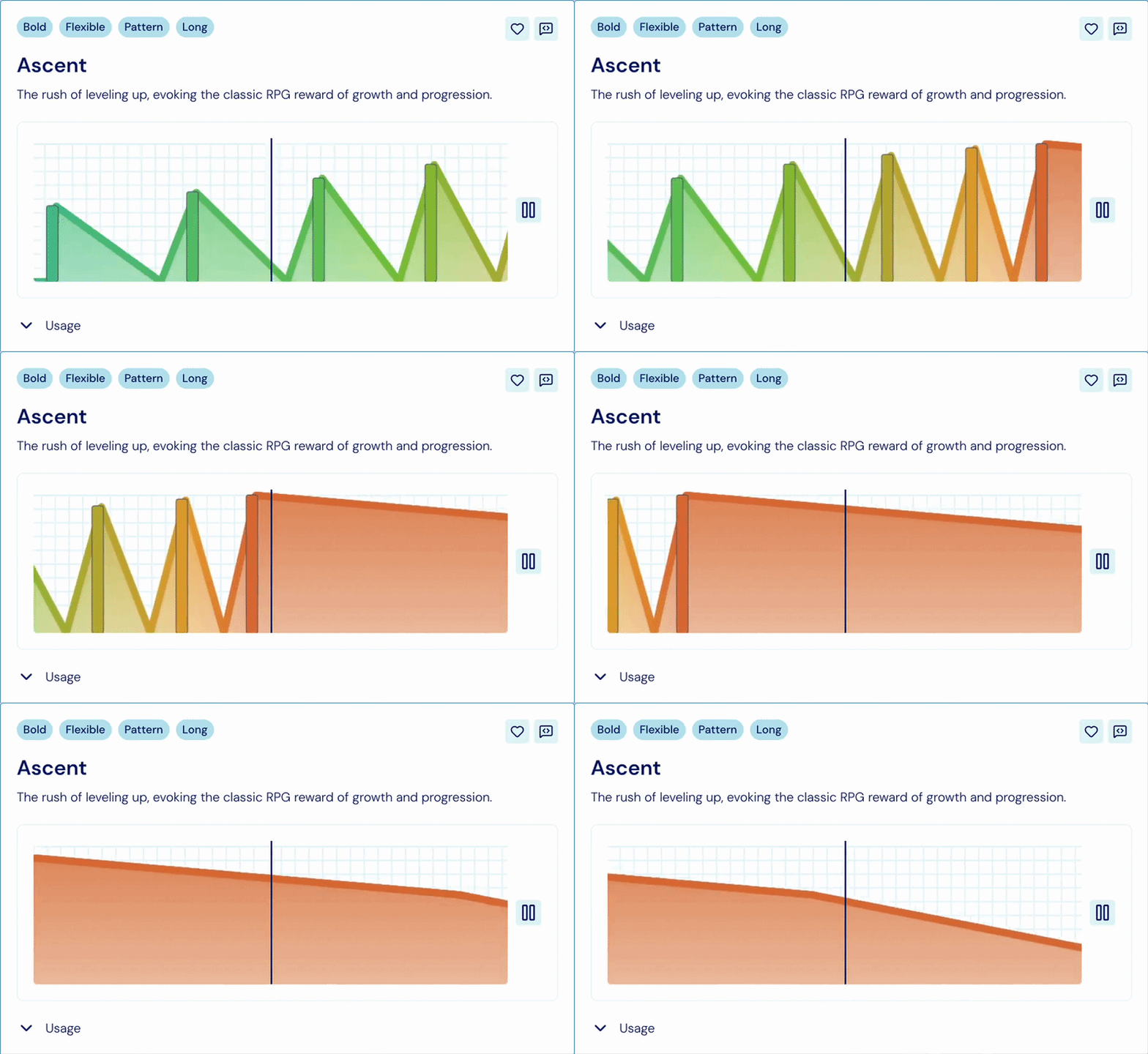
Including, and I'm not making these up: dogBark(), coinDrop(), heartbeat(), typewriter(), vortex(), and my personal favourite, flush(). Described in the docs as "the involuntary heave of disgust, ideal for aversion reactions or gross-out moments in playful UI contexts".
Finally, a haptic for when your PM asks for "just one more small change" on a Friday at 5pm.
Calling a preset is exactly as boring as you'd hope:
import { Presets } from 'react-native-pulsar'; Presets.hammer(); // I did it all on my own, no promo
That's the simplest way to use Pulsar. One line, one preset, done.
But if none of the 147 presets fit what you need, you can build your own.
A Pulsar pattern is made of two ingredients.
The first is short taps. Single bursts at specific points in time, like a double-knock or a quick triple-tick. You list them out: tap at 0ms, tap at 100ms, tap at 200ms, done.
The second is a sustained vibration whose strength and sharpness change over time. Think of it as a rumble that swells and fades. You describe it with a few points on a curve, and Pulsar fills in the rest.
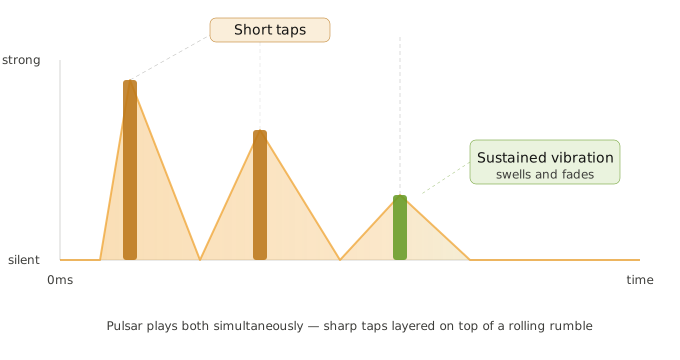
Simulators have no haptic hardware, so Pulsar generates audio from the pattern parameters in debug builds. You can actually hear the shape of your haptic without sprinting to a physical device every five minutes.
Requirements: React Native 0.71+ and the New Architecture enabled.
If you're still on Legacy in 2026, Pulsar is the least of your problems.

Come to App.js Conf and Leave Your Basement
App.js Conf is back in Kraków. If you write React Native for a living, skipping it is a personality flaw. William Candillon, Jay Meistrich, Charlie Cheever and the rest of the cross-platform brain trust, all on one stage, within heckling distance.
Find out what's actually shipping in React Native and Expo before your CTO reads about it on Hacker News. Workshops, deep dives, hallway-track chaos, and a community that can tell the difference between Hermes and JSC without Googling.
Oh… and we'll be there too. Come say hi.
Because you're subscribed, you get 15% off… consider it hush money.
Ticket price goes up in May.

The Maths Beneath the Drawing
Picture this scene.
You're scrolling through a fitness app, and the route map traces itself over your morning run like a slow-drawn pen. Smooth. Satisfying.
You close the app and go make a sandwich.
Here's the thing.
Rendering an SVG on screen is the easy part, react-native-svg hands that off to native code.
The hard part is everything you do to a path before you draw it. Measuring its total length so you can animate a stroke-dash from 0% to 100%. Figuring out the exact coordinate of the pen head at 47% progress. Computing a bounding box so you can zoom to fit.
All of that, the actual geometry, is almost always done in JavaScript. Libraries like svg-path-parser walk every curve command, flatten beziers into line segments, and return numbers on the JS thread.
The same thread handles your scroll, your gestures, and whatever crimes Redux is committing in the background.
If your little dot stutters as it glides across the map, that's why.
Now imagine all of that maths happened somewhere else. Off the JS thread entirely. In C++, at native speed, return finished numbers before your next animation frame ticks.
That's what react-native-nitro-vector does.
Here's a path. A real one, parsed by the library:
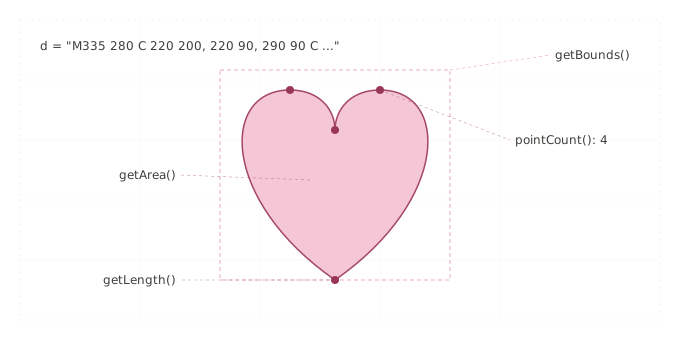
The bounding box, the length, the enclosed area, the four anchor points, all of it computed in C++, returned to JS as numbers, ready to feed whatever renderer you like. The library itself doesn't draw a single pixel. It's the maths underneath the drawing.
import { vectorEngine } from 'react-native-nitro-vector'; const path = vectorEngine.parseSvgPath( 'M335 280 C 220 200, 220 90, 290 90 C ...' ); path.getLength(); // 847.3 path.getBounds(); // { x: 220, y: 70, width: 230, height: 210 } path.getArea(); // 28240.5 path.pointCount(); // 4
Or build one by hand, the way every graphics library on earth does it:
const heart = vectorEngine.createPath(); heart.moveTo({ x: 0, y: 0 }); heart.lineTo({ x: 100, y: 0 }); heart.curveTo({ x: 100, y: 50 }, { x: 50, y: 100 }, { x: 0, y: 100 }); heart.close();
Now here's where you fall off your chair. Parsing one thousand SVG paths on Android with svg-path-parser (the popular JS one) is benchmarked at 443ms, while react-native-nitro-vector benchmarks at 4.2ms.
That's not a typo. That's not a new iPhone. That's 104× faster.
This isn't a renderer. You can't <NitroPath> your way to a drawn heart. You'd pair it with react-native-svg, Skia, or your own canvas solution, and use react-native-nitro-vector as the brain doing the math while the other library handles the pixels.
But that's exactly the niche where a library like this disappears into the plumbing and quietly makes the whole ecosystem faster. 95% of the repo is C++.
Seven GitHub stars at time of writing.
Give it six months.

Stop Screaming 'WHY' at Metro
It's 11pm. Your FlatList is re-rendering more than a Zoom call on hotel WiFi.
You've opened React DevTools, sprinkled console.log('WHY') through six components, and you're now staring at 420 lines of Metro output, hoping the word "WHY" shows up in a suspicious place.
Claude is sitting in the next tab, politely twiddling its thumbs.
metro-mcp by Stephen Radford (@steve228uk) is an MCP server that hands your AI agent (aka. Claude) actual debugger access to your running React Native app. Your agent can read your component tree, dispatch Redux actions, inspect network requests, profile your CPU, take screenshots, and most importantly, stop guessing.
Setup is one line:
claude mcp add metro-mcp -- npx -y metro-mcp
No app changes. No native modules. It connects to Metro the same way Chrome DevTools does, via the Chrome DevTools Protocol, and exposes what it finds as tools your agent can call.
The conversation becomes less "here's my bug, tell me what it probably is" and more "here's my bug, go look at it yourself":
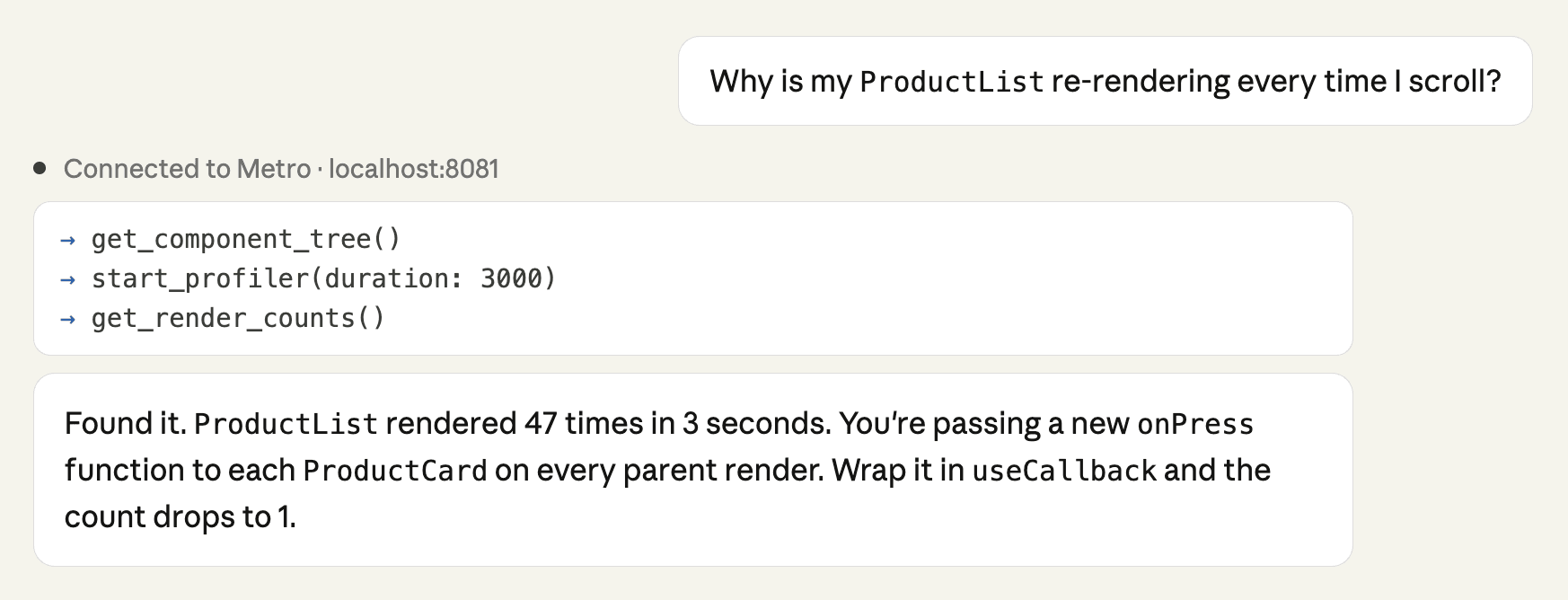
Ask "what's in my Redux store?" or "dispatch a CLEAR_CART action and tell me what changed." Ask it to "profile this screen transition and tell me what's slow", or the one that's going to save you four hours of audit work, "which elements are missing accessibility labels?"
You're welcome.
It's plugin-based, too. Write a definePlugin for your internal auth flow or feature flag system, and the agent just sees new tools appear.
It requires React Native 0.70+ and Hermes enabled.
But Free, MIT, and was built by one guy on a mission.
The console.log era had a good run.