

The Orb Says “Universal Components”
Most of you probably think that when we write this newsletter, we consult a large ethereal orb with candles in the background and an "Om Ganesha" soundtrack playing on YouTube.
Because how else could we be so on point with our predictions?
Do you remember in #32 when we said that with the introduction of Expo UI for SwiftUI and Jetpack Compose, we would start seeing codebases organised with MyComponent.android.ts and MyComponent.ios.ts, each with its own underlying UI implementation?
Well, we hinted at this being a problem, and Expo saw it that way, too.
We’re talking about the recently released Expo SDK 56 Beta, which addressed this with…
Drum roll…
Universal components in @expo/ui are a single API that supports iOS, Android and Web.
On Android? It quietly hands things off to @expo/ui/jetpack-compose.
On iOS? Off to @expo/ui/swift-ui it goes.
And on the web, you get JS implementations built on top of react-dom or react-native-web.
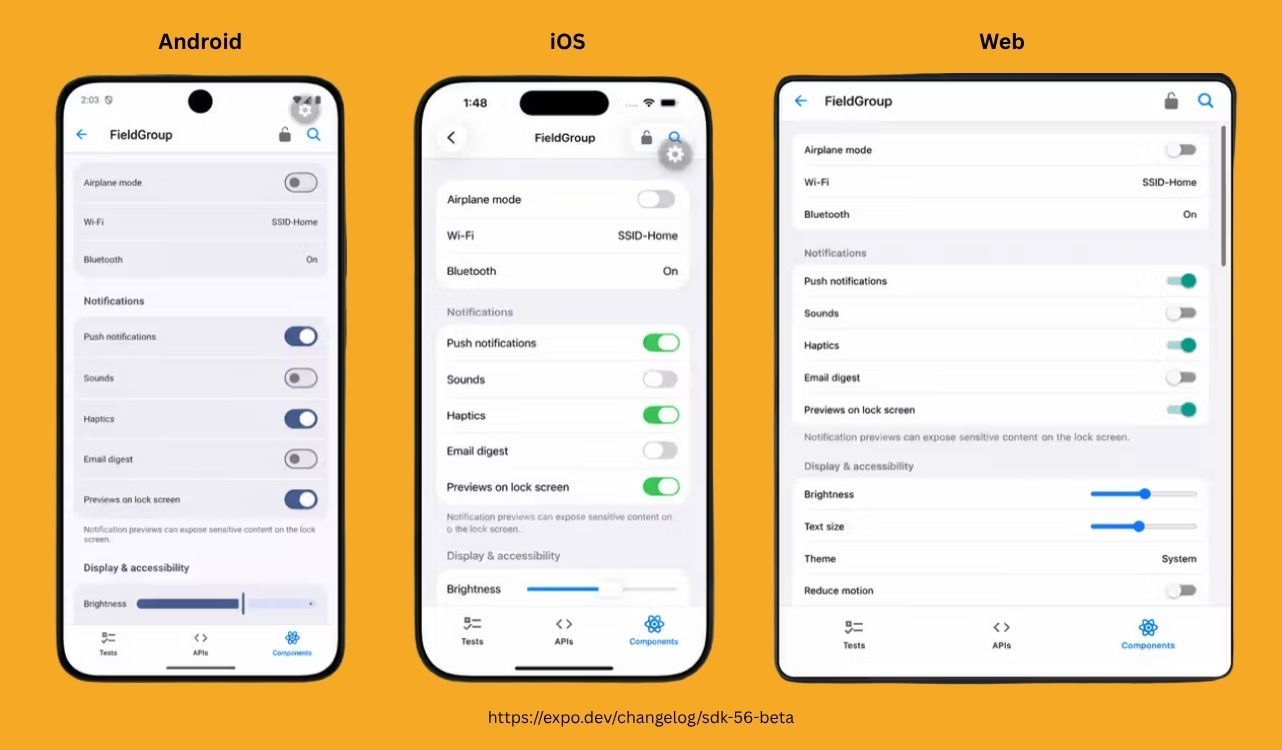
It looks like this:
// Works on ios, android and web import { Host, Column, Button, Text } from '@expo/ui'; export default function Example() { return ( <Host style={{ flex: 1 }}> <Column spacing={12} alignment="center"> <Text>Hello, world!</Text> <Button label="Press me" onPress={() => alert('Pressed')} /> </Column> </Host> ); }
And this would render on all platforms:
Now I can already hear half of you typing the same comment.
"Wait, isn't this just reinventing React Native?"
Fair question. So let's break it down because the answer is actually interesting and tells you a lot about where the whole ecosystem is quietly drifting.
When React Native showed up over a decade ago, the pitch was beautifully simple. Write JavaScript, get real native UI. And it delivered.
Your <View> became a UIView on iOS and an android.view.View on Android. Your <Text> became a UILabel and a TextView. The bridge did its thing, the magic worked, and everyone got a job at a startup.
Here's the catch, though.
The "native" that React Native was bridging to in 2015 is not the "native" Apple and Google are shipping in 2026.
UIKit on iOS?
Apple is still maintaining it, sure, but every interesting thing they announce now ships in SwiftUI first.
Same story on Android. Jetpack Compose is what Google now officially recommends, in writing, in their own docs. And they're migrating in classic Google fashion: launch the new way, quietly tag the old way "legacy", let it bake for a couple of years, then one day you wake up to a Play Console deadline nobody warned you about.
So what does that mean for a React Native app built on the classic component set?
It means your <View> is bridging to a UI primitive that the platforms are slowly moving away from.
It still works. It will keep working. But the gap between "feels native" and "feels like RN" is widening every WWDC and every Google I/O, and the people who notice it the most are the people you actually want to impress: native developers, designers, the App Store reviewers, your ex-girlfriend, actually, maybe that's just me.
This is the gap Expo UI is closing.
A <Button> from @expo/ui on iOS is not a JS lookalike of a SwiftUI button. It IS a SwiftUI button. Apple's animations, Apple's accessibility tree, Apple's dark mode handling, Apple's haptics, Apple's adaptation across iPhone, iPad, and whatever ski-goggle-shaped, eye-tracking, remortgage-the-house contraption Marques Brownlee unboxes next.
So no, this isn't reinventing React Native.
What's changed is what "native" means. The old answer was UIKit and Android Views. The new answer is SwiftUI and Jetpack Compose. Expo UI is just dragging the rendering target forward to where the platforms already are.
Honestly, at this rate, we should probably start workshopping a rebrand.
"The Expo Rewind" has a nice ring to it.

Build TV Apps with React Native on Vega OS
Developing for TV presents new challenges: directional navigation with a remote, focus management, smooth UI on constrained hardware, 10-foot UX.
Vega OS, Amazon's React Native-based TV operating system, helps with these challenges. Get spatial navigation APIs, focus management primitives, and performance tooling designed for hardware-constrained devices.
Unlock a new audience on Fire TV.
👉 Start building with Vega Developer Tools today.

A One-Line Geolocation Migration
Isn't just a line Freddie Mercury said, but it's something Marc Rousavy says when another module gets built on Nitro Modules (an alternative native module system for React Native that uses direct JSI bindings with C++).
No joke, he actually says this. We have friends everywhere.
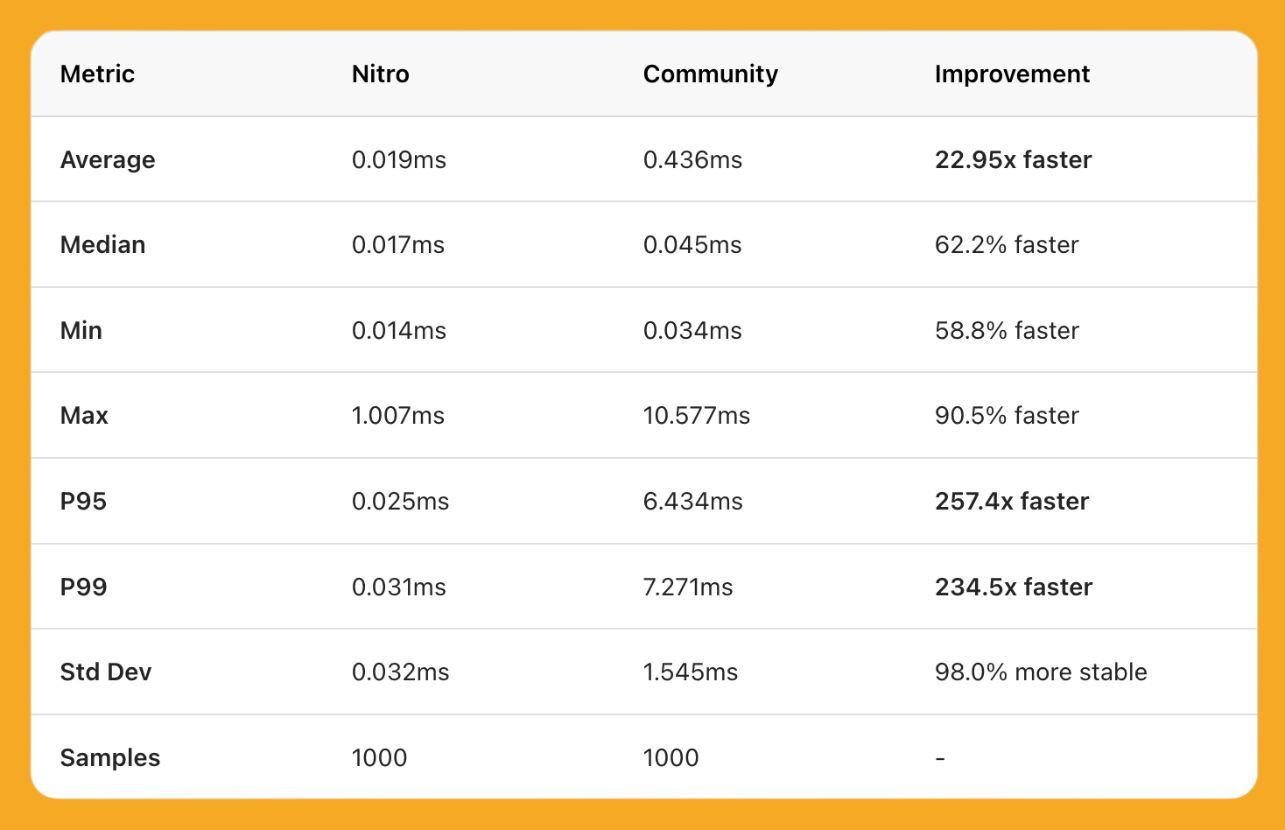
This time, the module in question is react-native-nitro-geolocation, and it's not a wrapper, not a polyfill, not a "let's vibe and see what happens" port. It's a full reimplementation of @react-native-community/geolocation, written in Nitro Modules.
Which, on cached reads of getCurrentPosition the performance story is what you'd expect:
But the part that's actually going to make people switch is the migration story.
Here's the entire migration from the old community geolocation library:
- import Geolocation from '@react-native-community/geolocation'; + import Geolocation from 'react-native-nitro-geolocation/compat';
That's it. One line. The /compat import is a 100% API compatible drop-in, so every getCurrentPosition, watchPosition, and clearWatch call you already have keeps working untouched.
Or, if you fancy something more modern, there's a fresh functional API with hooks that's honestly how it should have been built from day one:
import { requestPermission, getCurrentPosition, useWatchPosition, } from 'react-native-nitro-geolocation'; const status = await requestPermission(); const position = await getCurrentPosition({ enableHighAccuracy: true }); const { position, error } = useWatchPosition({ enabled: true, distanceFilter: 10, });
No more managing watch IDs by hand.
No more callback spaghetti.
Just a hook that gives you position and error, and cleans itself up when the component unmounts.
Oh, and there's a DevTools plugin via Rozenite (Rozenite brings plug-and-play panels to React Native DevTools) that lets you mock your location on an interactive map during development. Click anywhere in the world. Boom, your app thinks you're there. No more hardcoding 37.7749, -122.4194 to pretend you're in a San Francisco coffee shop from your sofa in Madrid.

Will every Nitro-powered library follow this pattern of "drop-in replacement plus a modern API"?
Probably.
Should every legacy community module live in fear?
Absolutely.
Marc is coming.
Revolution is not for the sane.
👉 react-native-nitro-geolocation

Six Lines That Will Crash Your App
Every fast native module you've installed (Reanimated, MMKV, VisionCamera, Gesture Handler) is built on JSI (JavaScript Interface). To understand what JSI does, you need to know what it replaced.
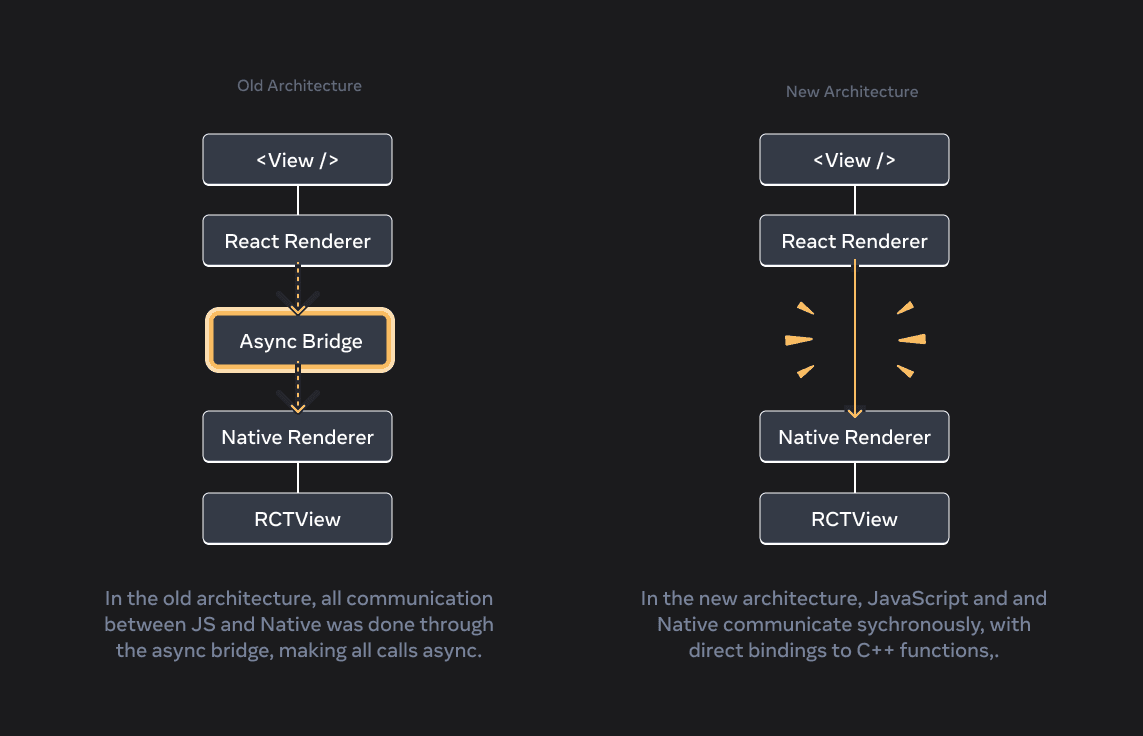
Before JSI, when JavaScript wanted to call native code, it sent a message across something called "the bridge." JS would serialise the call to JSON, hand it off, wait, and eventually receive a response.
Asynchronous, slow, and you couldn't do it often without dropping frames.
JSI removed the bridge. Now JavaScript can call C++ functions directly, the same way it calls a regular JS function. No serialisation, no waiting, no Promise. You call it, it returns, done.
In a basic Hello World JSI tutorial, your function is six lines of C++:
// What every JSI tutorial shows you auto getTemp = jsi::Function::createFromHostFunction( rt, jsi::PropNameID::forAscii(rt, "getDeviceTemperature"), 0, [](jsi::Runtime& rt, const jsi::Value&, const jsi::Value*, size_t) { return jsi::Value(readTempSensor()); // ← what could go wrong? }); rt.global().setProperty(rt, "getDeviceTemperature", std::move(getTemp));
So why would you ever write raw C++ instead of just using Nitro Modules or Turbo Modules?
Honestly, you probably shouldn't.
Nitro and Turbo Modules let you write Swift and Kotlin (with C++ glue generated for you) and still get the fast, direct calls to JavaScript. For 95% of native code you'd ever write, that's the right answer.
The 5% where raw C++ makes sense: you're sharing native code between iOS and Android, or you're wrapping an existing C++ library (audio codecs, ML runtimes, crypto). That's why Reanimated's worklets, VisionCamera's frame processors, and MMKV are written in C++.
JSI is the C++ interface the Hermes engine implements, and it sits on top of the garbage collector, shared memory between JS and C++, background threads, and the native build. A bug in your module can come from any of them, and the crash report won't point at your code.
Take memory. JavaScript frees memory automatically when nothing's using it. C++ doesn't. So when your C++ module shares a chunk of memory with JavaScript, who's allowed to free it?
Get the answer wrong, and JavaScript frees the memory while your C++ is still using it. Your app crashes in production, the stack trace is fifty frames deep in code you didn't write, and your six-line C++ function isn't in any of them.
If you want to understand this stuff, our friends at Heart IT have written a 12-part deep dive on JSI.
It's the most thorough thing we've read on what's actually happening underneath the libraries you use every day.
👉 Heart IT 12 Part JSI Deep Dive